
Sports Come APK – Features, Download, Installation, Compatibility and Safety Guide
Sports have become a very popular way to enjoy mobile entertainment. With smartphones and fast internet, you can follow sports from almost anywhere. That is why more people now look for Android apps with sports information and entertainment. Sports Come APK is one of the words people use when they search for a Sports Come app for Android.
An APK is an Android app package. You can install it by hand on a compatible phone. This is different from getting an app directly from an official app store. Manual installation can be handy. But you should always check the app, check compatibility, review permissions, and make sure the APK comes from a trusted source.
This complete guide explains Sports Come APK in simple words. You will learn what the APK means and why people search for it. We also cover possible features, download tips, installation steps, Android compatibility, permissions, safety, common problems, updates, and common questions.
What Is Sports Come APK?
Sports Come APK is an Android package for an app named Sports Come. APK stands for Android Package Kit. It is the file type Android uses to share and install apps.
When an app comes as an APK, you can download the file and install it by hand on your phone. This can help when the app is not available through your usual way of installing apps.
But the name alone does not prove that an APK is real. Different apps can have similar or even the same names. So always check the app name, developer details, version, permissions, and source before you install.
Why Are People Searching for Sports Come APK?
Sports fans now use their phones to stay close to their favorite sports. A phone is an easy way to get information without sitting in front of a computer.
People may search for Sports Come APK for different reasons. Some want to know more about the app. Some want an Android installation file. Some want to check if the app works on their phone.
Another reason is ease. An APK lets Android users install an app by hand. They do not have to depend fully on an app store.
Whatever the reason, focus on finding the right app. Do not download the first APK you see online.
Sports Come APK Features
The features of Sports Come can depend on the app version. Apps change over time. So always check the details of the version you are downloading.
Sports apps for Android may offer features like these.
Mobile-Friendly Experience
A mobile app makes sports content easier to use on phones and tablets. You can open it while travelling, resting at home, or using mobile data.
A well-made app should also work well on different screen sizes.
Sports-Related Content
A sports app is mainly made for sports information or entertainment. Depending on the app, you may find different sections about sports.
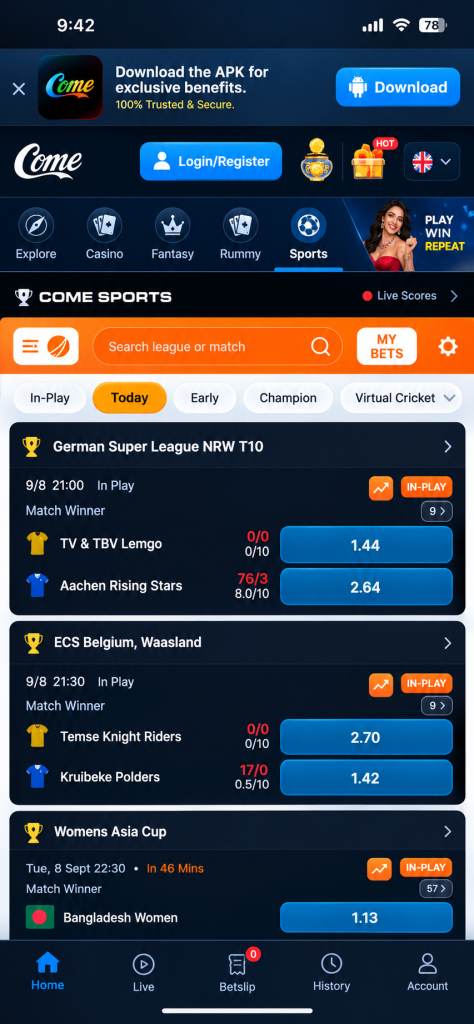
The content can change with the app version and its service.
Easy Navigation
Simple navigation matters in mobile apps. People like an app where they can find important sections without extra steps.
Clear menus, categories, buttons, and sections make an app easier to use.
Performance Improvements
App updates may bring speed improvements and bug fixes. Developers can also release new versions to work better with newer Android phones.
So check if a newer compatible version is available before you install an old APK.
एंड्रॉइड संगतता
A well-supported app can work on many Android phones. But it is never sure to work on every phone.
The Android version, hardware, processor type, storage, and other needs can decide if an APK works well.
Sports Come APK Download
Before you download Sports Come APK, take a few minutes to check the file details.
Important details can include:
- ऐप का नाम
- Version number
- फ़ाइल का आकार
- Developer details
- एंड्रॉइड की आवश्यकताएँ
- File format
- Permissions needed
- Source of the APK
Do not download an APK just because the file name looks right. Check the app details first.
If many versions are available, pick the one that suits your phone. After the download, scan the file with a trusted security tool before you open it.
Also keep enough free space on your phone. A failed or half-finished download can cause installation problems.
How to Download Sports Come APK
The download steps are simple.
First, visit a trusted page that has the APK details. Check the app information. Make sure the file is for the app you want to install.
Next, tap the download option and wait for the APK file to finish. If your internet is weak, do not close the browser during the download.
When the download is done, open the Downloads folder and find the APK file.
Before you install, check the file once more. If anything looks strange, stop. Continue only when you are sure the file is real.
How to Install Sports Come APK on Android
After you download the APK, you can usually install it by hand with these steps:
- Open the Files or Downloads app on your Android phone.
- Find the Sports Come APK file.
- Tap the file to start installing.
- Android may show a security warning about installing apps from outside the official app store.
- Read the warning. Continue only if you trust the source and the file.
- Allow the needed installation permission if Android asks.
- Go back to the APK file and continue the installation.
- Wait until the installation is finished.
- Open Sports Come and check the permissions it asks for.
The steps can be a little different on each phone brand and Android version.
Samsung, Xiaomi, Vivo, Oppo, Tecno, Infinix, Realme, and other brands may keep the APK installation settings in different places.
Is Sports Come APK Safe?
Safety is one of the most important things to check before you install any APK.
An APK can be real. But files from unknown websites may be changed or may come with unwanted software. So do not treat every APK you find online as safe.
Before you install, check where the file came from. Compare the app details. Read the developer information. Make sure the app name matches the one you wanted.
A security scan gives you one more layer of safety.
Also stay away from suspicious versions that make big, unreal promises or ask for too many permissions.
Sports Come APK Permissions
Permissions let an Android app use certain features or information on your phone.
Depending on the app, permissions may be about notifications, network access, storage, or other phone functions.
Before you approve a permission, ask yourself if it makes sense for what the app does.
For example, if an app has no reason to use some personal information, find out more before you give permission.
Permissions can change when developers release new versions. So always check the permissions of the version you are installing.
Sports Come APK Compatibility
Android compatibility depends on a few technical things.
The most important ones are:
- Android version
- Free storage
- Phone hardware
- Processor type
- App requirements
- APK version
A phone with an older Android version may not support a newer app. In the same way, an APK made for one processor type may not work well on another phone.
If you are not sure about compatibility, check the requirements listed with the APK before you download it.
Sports Come APK on Different Android Phones
Many companies make Android phones. Each company can change how Android looks and works.
For example, Samsung phones may have a different settings screen from Xiaomi or Vivo phones. Oppo, Tecno, Infinix, and Realme phones can also have different security menus.
The basic steps to install an APK are almost the same. But the permission settings may have different names.
If you cannot find the install option, open your phone’s Settings and use the search bar. Search for words like Install Unknown Apps or Unknown Sources.
Turn on this permission only for a source you trust.
Common Sports Come APK Installation Problems
Sometimes an APK does not install properly. The good news is that most problems have simple reasons.
Insufficient Storage
If your phone is almost full, Android may not finish the installation.
Delete files you do not need. Or move important photos and videos to another place. Then try again.
Incompatible Android Version
An APK may need a newer Android version than your phone has.
Check the app requirements before you try to install again.
Damaged APK File
A download that stops in the middle can give you a broken file. If the APK does not install, download a fresh copy from a trusted source. This may fix the problem.
Installation Permission
Android may block an APK if your browser or file manager does not have permission to install apps.
Check the security settings. Allow installation only when you trust the source.
Application Crashes
Sometimes the app installs but closes right away. In that case, restart your phone and check compatibility. The APK version may also be the problem.
How to Keep Your Android Device Safe
Always use good safety habits when you install an APK.
Keep your Android system updated when you can. Use your phone’s security features. Do not turn off protection just to install an unknown file.
Do not install cracked or modified APKs because they promise extra features. Modified apps can put your safety and privacy at risk.
Also do not give extra permissions to apps. If an app asks for access that does not look right, find out more before you go ahead.
Never type private information into an app unless you trust it and know how it uses your data.
Sports Come APK Updates
Updates can make an app faster, fix bugs, improve compatibility, and add new features.
If you already have an older version, check the new APK details before you update. Make sure the new package is for the same app.
Keep a backup of important data when needed, especially if the app saves your data on your phone.
Do not think every APK marked “latest” is really newer. Check the real version details. Do not trust only the title of a download page.
Should You Install Sports Come APK?
It depends on what you need and how well you can check the app.
If the app is useful for you and the APK comes from a trusted source, manual installation can be an option.
But do not rush. First check the app, check compatibility, scan the file, and review permissions before you install.
The safest way is to use official and verified sources whenever they are available.
Frequently Asked Questions
What is Sports Come APK?
Sports Come APK is an Android package for an app named Sports Come. You can install APK files by hand on compatible Android phones.
Can I install Sports Come APK on Android?
Yes. Android phones can usually install APK files by hand if the app is compatible and the needed installation permissions are on.
Is Sports Come APK safe?
It depends on the exact APK file and where it came from. Check the app, review the permissions, and scan the file before you install.
Why is Sports Come APK not installing?
There can be a few reasons. You may not have enough storage. Your Android version may not be supported. The APK file may be damaged. Or installation permissions may be blocked.
Can I use Sports Come APK on an old Android phone?
It depends on the Android needs of that version. Older phones may not support newer APK releases.
How can I update Sports Come APK?
Look for a newer compatible version from a trusted source. Make sure it is for the same app before you update.
Do APK files work on iPhone?
No. APK is an Android file type. iPhones use a different way to install apps.
Should I allow all APK permissions?
No. Read the permissions carefully. Allow only the access that makes sense for the app.
What should I do if the APK crashes?
Restart your phone. Check compatibility. Make sure the file downloaded fully. Also see if a compatible version is available.
Final Summary
Sports Come APK is a search term for an Android app that may interest people who want sports content on their phone or want to install an app by hand. APK installation gives Android users another way to install apps. But you should always do it with care.
Before you download Sports Come APK, check the exact app, developer details, version, Android requirements, permissions, and source. After the download, scan the file if you can. Then follow the normal Android installation steps.
If the app does not work well, check your storage, Android compatibility, installation permissions, and the APK file itself.
Most important, stay away from suspicious or modified files. Do not give extra permissions. A few simple safety checks can make APK installation much safer. They also help protect your phone and your personal information.